Skip to content
KT Multitracks Player Mac development preview

Built for the room. Ready for the moment.

Prepare the set.
Follow the moment.

The chorus goes again. The band comes in early. The room settles into prayer. Keep your tracks with you.

A native Mac workspace for your multitracks, stem mix and spontaneous worship.

Your whole set. One performance workspace.Native macOS
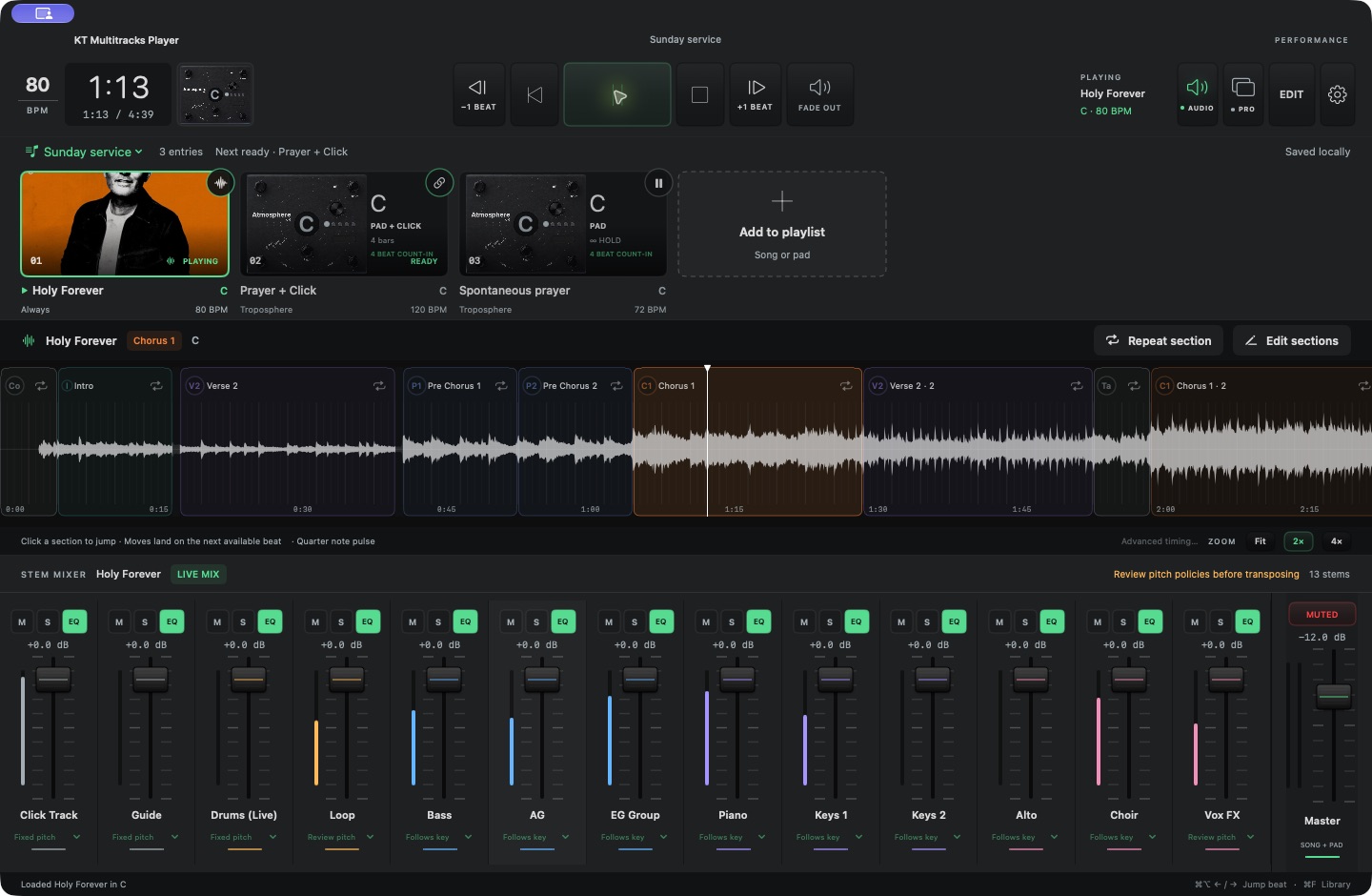
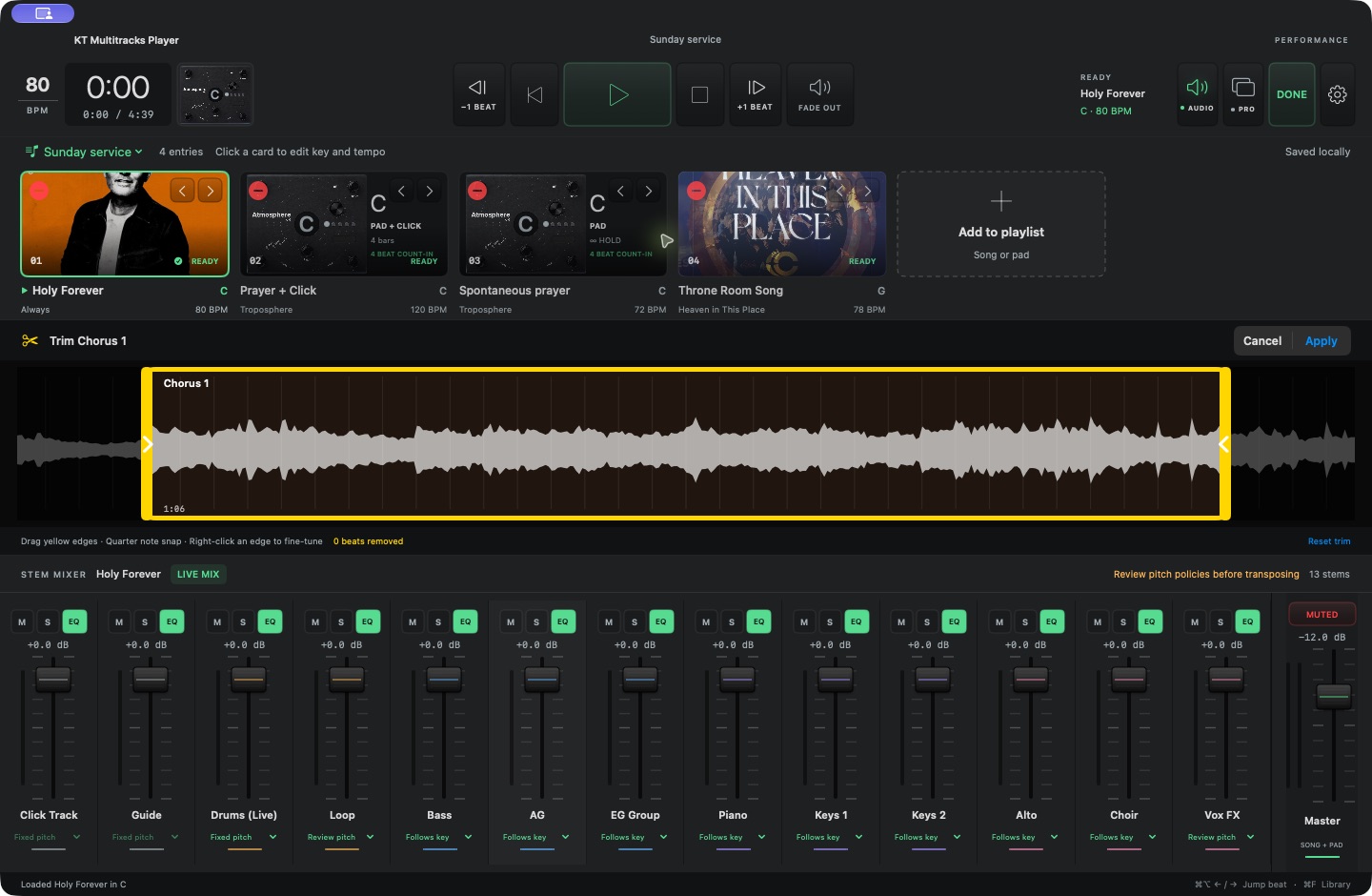
The native player with a horizontal playlist, section waveform, transport, and a mixer for individual audio stems.
Actual development build. Bring your own licensed multitracks and pad soundpack.
Synchronized stemsMusical section controlA mix for every momentPads + click + guide

Give the worship leader room

Structure when you need it.
Freedom when you don’t.

Keep the arrangement in sight without making it a fixed destination. Repeat a section, move to the next one, or stay on a pad. Every stem follows the same transport, so one musical decision moves the whole track.

01 / Follow the band

One more chorus?
Stay right here.

Use the colored song map to see where you are, choose where you’re going, and hold the section until it’s time to move.

A real player screen showing yellow trim handles around a chorus section.
Trim on the waveform with beat-snapped handles. Rename each section and keep repeated choruses separate.

Arm a repeat or queue a section jump on the shared beat scheduler. Jump back or forward one chosen beat to recover with the band while every stem moves together.

02 / Shape the sound

Every stem.
Your mix.

Bring the keys underneath a quiet moment. Drop the drums. Lift the guide in rehearsal. Keep a separate mix for each appearance of a song in the set.

Individual native stem channel strips with volume faders, mute, solo and EQ controls.
The actual native stem mixer
A

Volume, mute, solo and EQ

Four parametric bands plus high-pass and low-pass filters on every included stem. Mix changes apply directly to the audio graph.

B

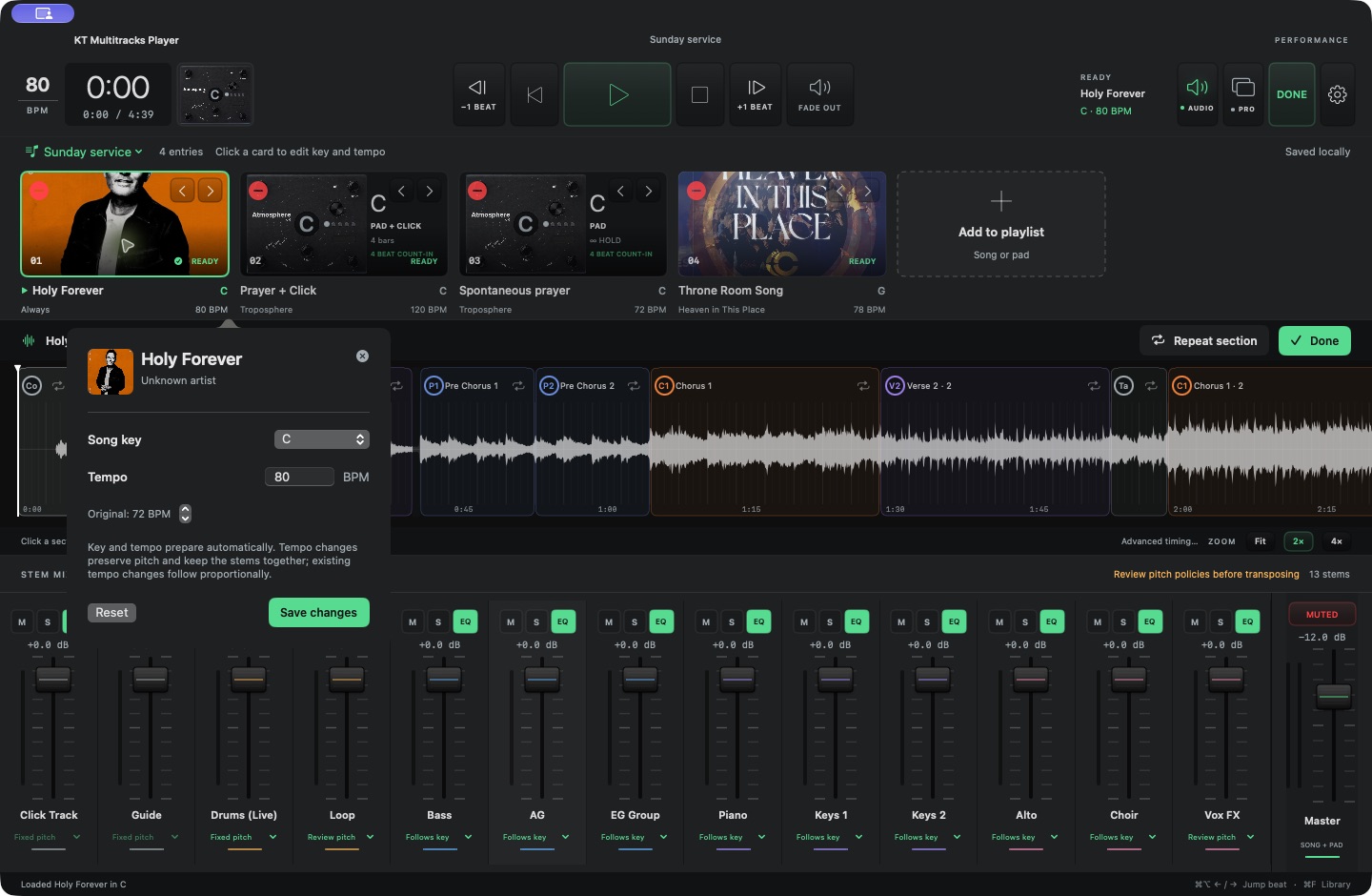
The key and tempo for this set

Prepare pitched instruments in your selected key while drums, click and guide keep their pitch. Change tempo with pitch-preserving processing across every stem; source tempo changes and section positions scale together.

C

Fade the music, keep the pulse

A dedicated fade control brings the music down or back up while click and guide continue. The independent ambient pad can keep sustaining.

03 / Let the room breathe

A pad can be
part of the set.

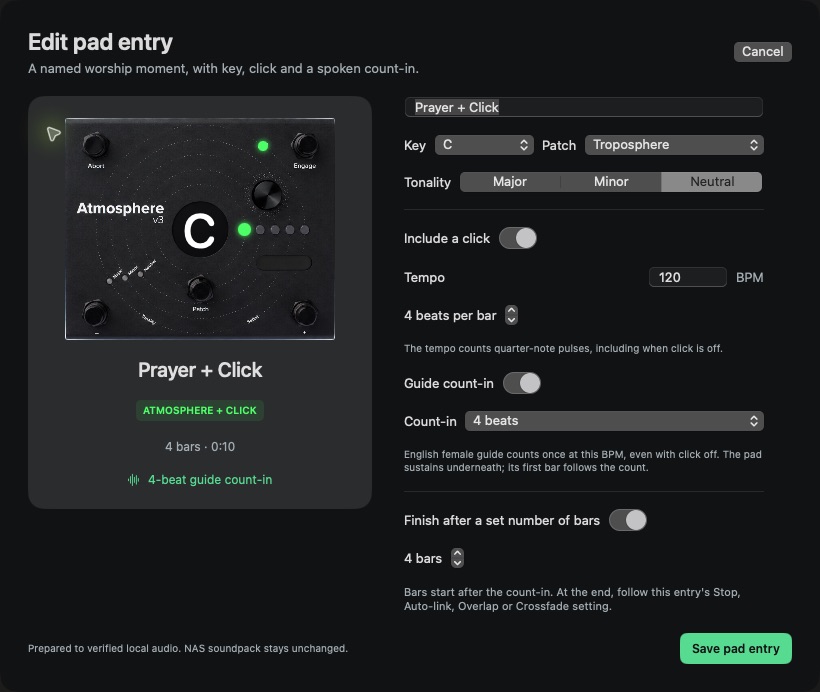
“Prayer in C” belongs right after the last song.

Add a named Atmosphere pad entry with its own key, patch and tonality. Hold it until you’re ready, or give it a bar count and a transition to the next song.

  • Optional click at the pad’s tempo
  • A spoken guide count-in, even without click
  • Timed endings or an indefinite hold
  • An independent mini-pedal for an ambient layer

Uses your existing Atmosphere soundpack. Commercial audio is not bundled.

Actual pad editor with a pedal preview, key and patch selectors, tempo, click, guide count-in and timed ending controls.
Configure the pad entry before the moment arrives.
From library to live

Build a set that
leaves options open.

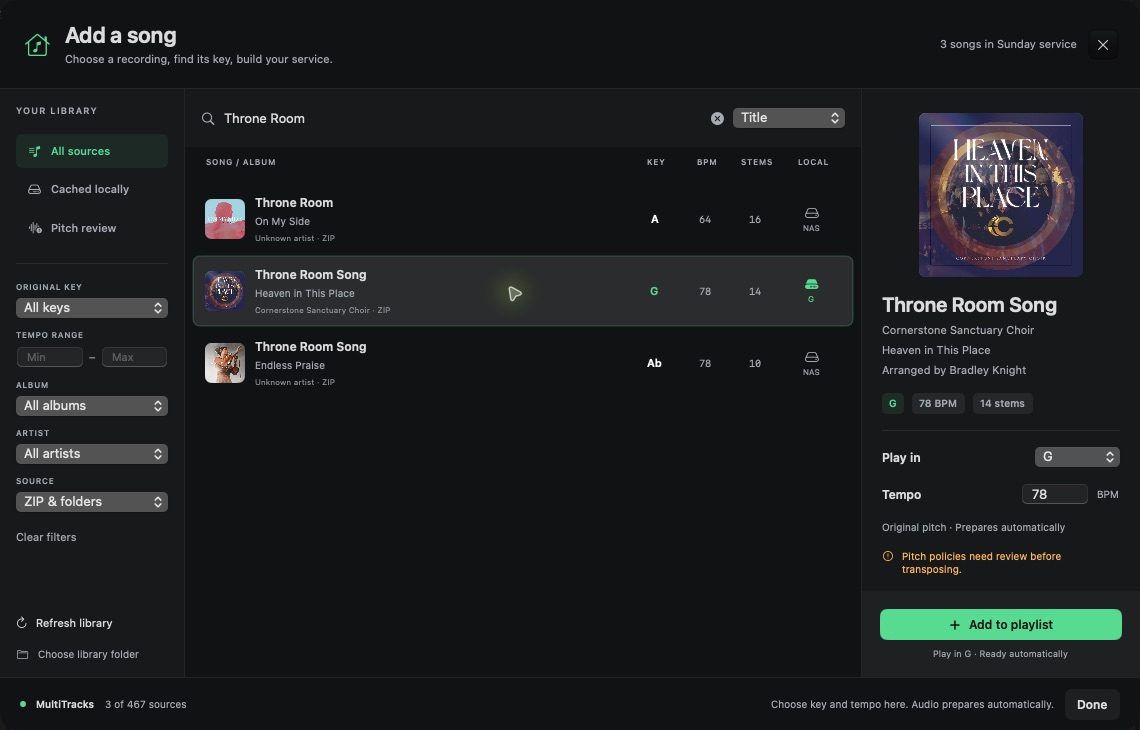
Your NAS holds the originals. The Mac keeps verified prepared audio close to the player.

  1. 01

    Find your songs

    Search by title, artist or album. Filter by key, tempo, source and locally prepared availability, then sort by the detail you need.

  2. 02

    Set the moment

    Choose key and tempo as you add a song, then edit them from its card. Stopped selections prepare automatically. Add a pad from the same playlist tile.

  3. 03

    Plan the handoff

    Choose Stop, Auto-link, Overlap or Crossfade. Prepare the next entry in advance and see when it is ready.

  4. 04

    Lead with confidence

    Use section repeat, beat correction and music fade as the set unfolds. Selection and preparation stay silent until you press Play.

Inside the current Mac preview

The details that make
the set work.

One place for the library, the arrangement and the mix.

Library & preparation

  • NAS folder and ZIP package indexing
  • Song, artist, album, key and tempo details
  • Search, combined filters and sorting
  • Automatic preparation when adding or selecting while stopped
  • Key and tempo selection per playlist occurrence
  • Pitch-preserving tempo changes across all stems
  • Offline key preparation with fixed-pitch stem policies
  • Verified local media caches for prepared songs
  • Original NAS audio stays unchanged

Arrangement & transport

  • Real audio waveform and colored sections
  • Section repeat and queued section jumps
  • One-beat backward and forward correction
  • Section names and beat-snapped edge trimming
  • Reviewed tempo maps and explicit beat units
  • Fit, 2× and 4× waveform views

Stem mixing

  • Per-stem volume, mute and solo
  • Green EQ, yellow Solo and red Mute active states
  • Four-band EQ plus high-pass and low-pass
  • Separate saved mixes per playlist occurrence
  • Audio-based meters and a master mute
  • Bounded strip widths with horizontal scrolling
  • Music fade preserves click and guide

Pads & transitions

  • Atmosphere patch, key and tonality selection
  • Named pad entries, with or without click
  • One global click sound for songs and pads
  • One-time spoken guide count-in
  • Timed bars or indefinite pad holds
  • Stop, Auto-link, Overlap and Crossfade
  • Next-entry preparation and manual handoffs

Native Mac workspace

  • Synchronized AVAudioEngine stem playback
  • Keyboard performance controls
  • Grouped native Settings with search
  • Saved playlists, mixes and timing edits
  • Independent ambient pad controls
  • Safe, silent launch without automatic playback

Connection awareness

  • Current and expected audio-device status
  • Visible sample rate and output-channel details
  • ProPresenter API reachability indicator
  • Separate MIDI destination availability
  • Clear reporting when prepared media is missing
  • Current preview uses the Mac’s default stereo output

Built in the open. Tested in stages.

A working Mac preview.
A bigger direction.

The native player is in active development. It is a local development preview, with no public installer or announced pricing yet.

Available to explore

macOS 13 or later
Apple silicon Mac development build
Your own licensed audio library

Ask about preview access
Planned / not available yet

Where we’re heading

These are development directions, with no release dates promised.

  • iPad & iPhone remoteA Mac playback engine with a remote performance surface.
  • Planning Center setlistsBring service songs and selected keys into the player.
  • SoundGrid & LV1 routingLive-rig driver, network and channel-routing validation.
  • ProPresenter automationNetwork MIDI pairing, cue transmission and end-to-end checks.
  • Deeper spontaneous controlChord-aware vamps and further tempo-control workflows.

Current connection indicators report device or API availability. They do not certify SoundGrid routing or ProPresenter cue delivery. Musical listening checks and rehearsal on your own rig remain part of evaluating the preview.

A few practical things

Before the
first rehearsal.

Does it include songs or commercial pad audio?

No. Bring multitracks and pad samples you are licensed to use. The preview indexes your library and prepares local playback audio. It does not grant rights to third-party recordings or soundpacks.

Do my songs need to be unzipped on the NAS?

Supported ZIP song packages can stay zipped. The player indexes their contents, then prepares verified local audio for playback. Originals remain on the NAS.

Can I use a different key without changing drums or guide?

Yes. Key preparation follows each stem’s pitch policy. Pitched instruments follow the selected key; drums, click and guide stay fixed. Ambiguous loops and tonal percussion need review before transposition.

Can I change a song’s tempo without changing its pitch?

Yes. Set the performance BPM for that playlist entry. The player processes every stem together with pitch-preserving tempo adjustment, keeping their shared timeline aligned. Source tempo changes and section beat positions scale proportionally. Rehearse the result with your actual tracks before using a new tempo live.

Can I choose one click sound for the entire set?

Choose Original, Classic, Blip, Cowbell, Gentle, Percussive, Saw or Woodblock in global Click settings. It applies to song click stems and pad clicks while stopped. For songs, replacement clicks retain the source’s actual pulse positions and gaps rather than rebuilding a guessed constant-tempo grid.

Can I play with the NAS disconnected?

A complete, verified matching local variant can play without the NAS. Songs and keys that have not been prepared still need their source files. Prepare and check the full set before disconnecting.

Is an iPad version or SoundGrid support available?

The current engine is a native Mac preview using the default stereo output. iPad/iPhone remote control, SoundGrid/LV1 routing, Planning Center import and automatic ProPresenter pairing are planned work.

Is this affiliated with MultiTracks.com or Playback?

KT Multitracks Player is an independent Kulinich Tech project. MultiTracks.com, Playback, Atmosphere, ProPresenter, Planning Center and SoundGrid are names of their respective owners. No affiliation or endorsement is implied.

Let’s build for real worship teams

Tell us what
your set needs.

Interested in the Mac preview? Tell us about your rig, your library and the moments you want more control over.

Talk to Kulinich Tech Other contact and support options

A Kulinich Tech project.
Tools that equip churches.